Title: WPMasterToolKit (WPMTK) – All in one plugin
Author: Ludwig You
Published: Fébruari 23, 2024
Last modified: Mei 7, 2026
---
Nggoléki Plugin

# WPMasterToolKit (WPMTK) – All in one plugin
Dening [Ludwig You](https://profiles.wordpress.org/ludwigyou/)
[Ngundhuh](https://downloads.wordpress.org/plugin/wpmastertoolkit.2.21.0.zip)
* [Detil](https://jv.wordpress.org/plugins/wpmastertoolkit/#description)
* [Mācā ulang](https://jv.wordpress.org/plugins/wpmastertoolkit/#reviews)
* [Pemasangan](https://jv.wordpress.org/plugins/wpmastertoolkit/#installation)
* [Pangembangan](https://jv.wordpress.org/plugins/wpmastertoolkit/#developers)
[Sokong](https://wordpress.org/support/plugin/wpmastertoolkit/)
## Katrangan
WP Master ToolKit is your all-in-one solution for optimizing WordPress. It streamlines
your dashboard, enhances workflows, and simplifies content and settings management.
Customize your WordPress installation effortlessly with all the tools you need at
your fingertips.
**Test by Alexis Fichou (WP-Origami) :**
**Test by Enzo (Easy WordPress) :**
#### 97 FREE modules
* Adminer: A full-featured database management tool.
* Advanced Debug Mode
* Allow Menu Custom Links to Open in New Tab.
* Apple Touch Icon: Manage app icon (Apple Touch Icon) individually.
* Auto Regenerate Salt Keys.
* Auto-Publish Posts with Missed Schedule: Automatically publish scheduled posts
marked as "missed schedule" across all post types.
* Ban Emails: Ban the chosen emails.
* Blacklisted Usernames: Prevent creation of user accounts with predefined blacklisted
or common usernames.
* Block User Registration from Disposable Email: Block user registration from temporary
disposable email addresses.
* Block 404 PHP File Scanning
* Browser Theme Color: Select a tag color to allow seamless theme customization
in all major browsers.
* Child theme generator: Generate a child theme directly from WordPress dashboard.
* Clean Profiles: Tidy up user profiles by removing sections you do not utilise.
* Clean Up Admin Bar.
* Code Snippets: Add custom code snippets without editing the theme’s **functions.
php**.
* Content Duplication: One-click duplication of pages, posts and custom post types
with taxonomy terms and post meta.
* Content Order: Custom ordering for hierarchical content types and those supporting
page attributes.
* Custom Admin CSS: Add custom CSS on all admin pages for all user roles.
* Custom Body Class: Add custom class(es) on the singular view of some or
all public post types.
* Custom COOKIEHASH
* Custom Frontend CSS: Add custom CSS on all frontend pages for all user roles.
* Disable All Updates: Completely disable core, theme and plugin updates and auto-
updates. Will also disable update checks, notices and emails.
* Disable Block-Based Widgets Settings Screen: Restore classic widgets settings
screen for non-block themes.
* Disable Dashboard Widgets: Clean up and speed up dashboard by disabling widgets
that won’t load assets.
* Disable Feeds: Disable RSS, Atom, and RDF feeds and remove feed URL references
from `` section.
* Disable Gutenberg: Selectively disable Gutenberg block editor for specific or
all post types.
* Disable REST API: Disable REST API for non-authenticated users and remove URL
traces.
* Disable Really Simple Discovery (RSD) Code: Insert tracking pixels, analytics, meta
tags, and custom scripts.
* Last Login Column: Display last login date and time in users list table.
* Limit Login Attempts: Prevent brute force attacks by limiting failed login attempts
per IP.
* Local avatars: Replaces GRAVATAR management with media management.
* Lock Admin Email: Prevent admin email address modifications.
* Lock Site URL: Prevent site URL modifications.
* Log In/Out Menu: Add dynamic login/logout menu items.
* Mail Catcher: Capture all outgoing emails.
* Maintenance Mode: Display customizable maintenance page. Administrators can still
access the site.
* Manage ads.txt and app-ads.txt: Edit and validate ads.txt files.
* Manage robots.txt: Edit and validate robots.txt file.
* Media Cleaner: Sanitize file names and auto-generate metadata (title, caption,
alt text, description).
* Media Encoder: Automatically convert images to WebP (AVIF in PRO).
* Meta Debugger: Display all metadata for a post, user, term, or comment.
* Move Login URL: Change the default login URL to a custom URL of your choice.
* Multiple User Roles: Assign multiple roles per user, useful for e-commerce or
LMS plugins.
* Nav Menu Visibility: Apply visibility controls to menu items.
* Obfuscate Author Slugs: Hide user slugs in author URLs and REST API endpoints.
* Obfuscate Email Addresses: Protect emails from spam bots via [wpm_obfuscate]
shortcode.
* Open All External Links in New Tab: Open external links in new tab with security
attributes.
* Password Protection: Password-protect entire site from public and search engines.
Admins retain access.
* Plugin & Theme Rollback: Revert plugins/themes to previous WordPress.org versions.
* Post Per Page: Set posts per page for each post type.
* Prevent User Enumeration: Block user enumeration via ?author= and REST API.
* Protect Website Headers: Add security headers to protect against phishing and
data theft.
* Quick Add Post: Quick button to add new posts faster.
* Redirect 404 to Homepage: Redirect non-existent pages to homepage.
* Redirect After Login
* Redirect After Logout
* Redirect Manager
* Revisions Control: Limit number of revisions saved per post type.
* Register Custom Content Types: Register custom post types and taxonomies.
* Search Replace in database
* SMTP Mailer: Configure sender name/email and external SMTP for reliable email
delivery.
* SVG Upload: Enable SVG file uploads.
* Temporary Login
* Wider Admin Menu
#### 31 Pro Modules
* 410 Manager
* Add Essentials Shortcodes
* Admin Menu Organizer
* Auto clean actionscheduler_actions: Clean actionscheduler_actions database table
from actions that have been completed | failed | cancelled.
* Better Password Hash
* Password Expiration
* CRON Manager: Manage cron events on your website.
* Change Database Prefix: Quickly change your WordPress database prefix to save
time and enhance security.
* Custom Login Design: Personalize your login page to match your brand.
* Disable Comments: Manage the visibility of comments on your public posts by selectively
disabling them for specific post types or across all posts.
* Disable Plugin For Debug: Temporarily disable specific plugins to troubleshoot
and debug issues on your WordPress site without uninstalling.
* Disable Woocommerce Logout Confirmation
* Disallow Access WP Sensible Files: Delete the wp-config-sample.php, block access
to readme.html, license.txt
* Disallow Countries IP
* Download medias as zip
* Force Send All Email To: Force all emails sent from your website to be sent to
a specific email address.
* Generate Alt Text With AI: Automatically generate alternative text using AI.
* Head Sorter: Automatically sorts and optimizes the of your website, making
sure important tags load first for better speed and SEO.
* Hook And Filter Debugger: Displaying the sequence of action and filter hooks
by their origin on a single page.
* Link Shortener: Shorten your links with a custom prefix. You can also track the
number of clicks on each link.
* Manage Admin Emails Notifications: Check the types of emails you no longer want
to receive as an administrator.
* Media Replacement
* My Account Menu Customizer: for WooCommerce My Account page.
* No Plugin Activation / Deactivation / Deletion: Prevents plugin activation, deactivation,
and deletion for enhanced security.
* Paste Image In Media: With this feature you can paste directly your picture in
WordPress media.
* Plugin Download: Download plugins from the plugins page in the WordPress admin
panel.
* Post Type Switcher
* Two Factor Authentication
* Updates Logs: Track and record the most recent login activity of site users,
then showcase the date and time in the users list table
* User Switching
* Vulnerabilities Scan
#### PRO Additionnals Features
* Move Login URL: Block access to /wp-admin with server side 403 error for non-
logged users.
* Maintenance Mode: Real countdown timer with automatic site activation. Bypass
link generation for access during maintenance. Exclude specific URLs from maintenance
mode.
* Media Encoder: Convert images to AVIF format (PHP ≥ 8.1). Free version limited
to WebP only.
* Mail Catcher: Unlimited email capture. Free version limited to 5 emails per day.
* Advanced Debug Mode: Live log streaming viewer with real-time monitoring. Daily
logs with date suffix. Custom log path with enhanced protection.
* Search Replace in database: several search/replace pairs, support for regular
expressions and a much more complete detailed overview of detected changes.
* SMTP Mailer: 19+ premium providers including Gmail, Outlook, SendGrid, AWS SES,
Brevo, Mailgun, Mailjet, Postmark, SparkPost, MailerSend, Resend, SendLayer,
SMTP.com, SMTP2GO, Elastic Email, Zoho Mail, SendPulse, Mandrill, and Pepipost.
Free version limited to PHP mail and generic SMTP.
* Redirect Manager: Advanced redirect engines (Apache and Nginx), redirect logs,
and CSV import/export. Free version limited to WordPress (PHP) redirects without
logs/import-export.
⭐️ UPGRADE TO PRO VERSION: [WPMasterToolKit Pro](https://wpmastertoolkit.com) ⭐️
### Other plugin by Webdeclic
[Webdeclic](https://webdeclic.com) is a French web agency based in Paris. We are
specialized in the creation of websites and e-commerce sites. We are also the creator
of the following plugins:
* [QuickWebP](https://wordpress.org/plugins/quickwebp/)*
[Cookie Dough](https://wordpress.org/plugins/cookie-dough-compliance-and-consent-for-gdpr/)*
[Univeral Honey Pot](https://wordpress.org/plugins/universal-honey-pot/) * [Clean My WP](https://wordpress.org/plugins/clean-my-wp/)*
[Mentions Legales Par Webdeclic](https://wordpress.org/plugins/mentions-legales-par-webdeclic/)*
[Lexilink](https://wordpress.org/plugins/lexilink/) * [Show all plugins on WordPress.org](https://wordpress.org/plugins/search/webdeclic/)
## Gambar conto
* [[
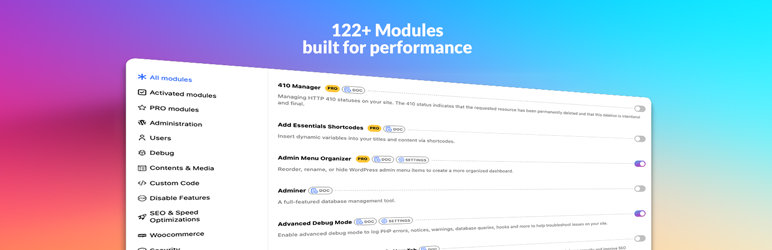
* Activate the modules you need to customize your WordPress according to your needs.
A disabled module will have no impact on your site.
* [[
* Create temporary users to give limited access to your site, ideal for developers,
customer support or collaborators.
* [[
* Adminer for managing your database and File manager for managing your files directly
from the WordPress dashboard.
* [[
* Unlock full potential of your WordPress with the PRO version, including advanced
debugging tools, media encoding to AVIF, and much more.
* [[
* Configure the SMTP Mailer module to send emails reliably through your own SMTP
server, with support for authentication, encryption, and a test email feature.
* [[
* WPMTK includes many security features to protect your site, such as Disallow
Access WP Sensible Files, Limit Login Attempts, Move Login URL, and more.
* [[
* Code Snippets module allows you to add custom PHP without editing your theme’s
files, keeping your customizations safe during updates.
* [[
* Media Encoder module automatically converts your images to WebP (and AVIF in
PRO) for faster loading times and better performance.
## Pemasangan
1. Upload the plugin files to the `/wp-content/plugins/wp-mastertoolkit` directory,
or install the plugin through the WordPress plugins screen directly.
2. Activate the plugin through the ‘Plugins’ screen in WordPress
3. Use the WPMasterToolKit screen to configure the plugin
## FAQ
### What is WPMasterToolKit?
WPMasterToolKit is a comprehensive plugin that provides a wide range of features
designed to improve your WordPress. It includes tools to improve media management,
user interface, site security and much more.
### Will WPMasterToolKit slow down my website?
No, WPMasterToolKit is designed to be lightweight and efficient. This should not
negatively impact your website performance.
### Can WPMasterToolKit help with SEO?
Although WPMasterToolKit is not primarily an SEO plugin, it does include features
that can help your site’s SEO, such as the ability to open external links in a new
tab with the appropriate “rel” attributes.
### How often is WPMasterToolKit updated?
We regularly update WPMasterToolKit to introduce new features, fix bugs and ensure
compatibility with the latest versions of WordPress.
### How can I contribute to WPMasterToolKit?
Contributions are welcome! You can contribute by reporting bugs, suggesting features,
translating the plugin, or submitting code fixes.
### Is WPMasterToolKit similar to ASE ?
Yes, WPMasterToolKit is similar to Admin and Site Enhancements (ASE), WP Extended
and other all in one plugin.
### Can I replace my security plugin with WPMTK?
Yes, WPMTK includes many security features that can replace your existing security
plugin. WPMTK includes up to 90% of the features known from security plugins like
Wordfence, Sucuri, iThemes Security, SecuPress, etc.
### Can I replace plugins like Imagify or ShortPixel?
Yes, WPMTK includes a media encoder that can convert images to WebP and AVIF if
you have the PRO version. This very similar to the features of Imagify and ShortPixel,
the big difference is that WPMTK convert your images locally and not on the cloud.
So you don’t need to worry about your images being uploaded to a third party server.
### How can I report security bugs?
You can report security bugs through the Patchstack Vulnerability Disclosure Program.
The Patchstack team help validate, triage and handle any security vulnerabilities.
[Report a security vulnerability.](https://patchstack.com/database/wordpress/plugin/wpmastertoolkit/vdp)
### Does WPMasterToolKit work with WooCommerce?
Yes, WPMasterToolKit is fully compatible with WooCommerce. It includes specific
features like disabling WooCommerce logout confirmation, customizing the My Account
menu, and disabling cart fragments scripts to improve performance. Many WooCommerce
store owners use WPMTK to enhance their site security and optimize their admin dashboard.
### Can I disable Gutenberg editor with this plugin?
Yes, WPMasterToolKit allows you to selectively disable the Gutenberg block editor.
You can choose to disable it for specific post types or all relevant post types,
giving you full control over when to use the classic editor or the block editor.
### How do I set up SMTP email on WordPress with WPMasterToolKit?
WPMasterToolKit includes a comprehensive SMTP Mailer module that supports 19+ popular
email providers including Gmail (with OAuth 2.0), Outlook, SendGrid, AWS SES, Brevo(
formerly Sendinblue), Mailgun, Mailjet, and more. Simply enable the SMTP Mailer
module, select your provider, enter your credentials, and send a test email to verify
the configuration.
### Is WPMasterToolKit compatible with page builders like Elementor and Divi?
Yes, WPMasterToolKit is fully compatible with popular page builders including Elementor,
Divi, Beaver Builder, and others. The plugin doesn’t interfere with page builder
functionality and can actually enhance your workflow with features like content
duplication and custom body classes.
### Can I duplicate posts and pages with WPMasterToolKit?
Yes, the Content Duplication module enables one-click duplication of pages, posts,
and custom post types. When you duplicate content, the corresponding taxonomy terms
and post meta are also duplicated, making it perfect for creating similar content
quickly.
### Does this plugin help prevent brute force attacks?
Yes, WPMasterToolKit includes multiple security features to prevent brute force
attacks: Limit Login Attempts to restrict failed login attempts per IP address,
Move Login URL to hide your login page from automated bots, and Blacklisted Usernames
to prevent common usernames like “admin” from being created.
### Can I manage my WordPress database with this plugin?
Yes, WPMasterToolKit includes Adminer, a full-featured database management tool
that allows you to browse, edit, and manage your WordPress database directly from
your admin panel without needing phpMyAdmin.
### How do I disable XML-RPC in WordPress?
WPMasterToolKit provides a simple one-click solution to disable XML-RPC. Just enable
the “Disable XML-RPC” module in the plugin settings. This helps protect your site
from XML-RPC attacks and DDoS attempts that target this feature.
### Can I create a child theme with WPMasterToolKit?
Yes, the Child Theme Generator module allows you to create a child theme directly
from your WordPress dashboard in just a few clicks. You can even disable the module
after generating your child theme to save resources.
### Does WPMasterToolKit work with multisite installations?
Yes, WPMasterToolKit is compatible with WordPress multisite installations. You can
network activate it or activate it on individual sites within your multisite network.
### How do I disable WordPress REST API for non-authenticated users?
Enable the “Disable REST API” module in WPMasterToolKit. This will disable REST
API access for non-authenticated users and remove URL traces from the `` section,
HTTP headers, and WP RSD endpoint, improving your site’s security.
### Can I add custom code snippets without editing functions.php?
Yes, the Code Snippets module allows you to add custom PHP, CSS, and JavaScript
code snippets directly from your WordPress dashboard without editing your theme’s
functions.php file. This keeps your customizations safe even when you update your
theme.
### Can I convert images to WebP format automatically?
Yes, the Media Encoder module automatically converts uploaded images to WebP format(
or AVIF in the PRO version with PHP 8.1+). This significantly reduces image file
sizes and improves your site’s loading speed without sacrificing quality.
## Mācā ulang

### [Propre et efficace !](https://wordpress.org/support/topic/propre-et-efficace/)
[Tibow](https://profiles.wordpress.org/pyho/) April 15, 2026 1 reply
Bravo à Ludwig pour ce plugin qui fait des merveilles, et qui trouve place dans
la plupart des projets WordPress que je réalise pour mes clients depuis quelques
mois. 5 stars for you

### [WOW- this is AMAZING- and it WORKS!](https://wordpress.org/support/topic/wow-this-is-amazing-and-it-works/)
[jeanedwa](https://profiles.wordpress.org/jeanedwa/) Desèmber 18, 2025 1 reply
A+Excellent plugin! Now that it’s been verified again, it is working beautifully.
I’ve replaced so many other plug-ins and actions… What a brilliant plug-in. I’d
highly recommend it..!

### [WPMT is a must have admin tool for WP](https://wordpress.org/support/topic/wpmt-is-a-must-have-admin-tool-for-wp/)
[Spencer](https://profiles.wordpress.org/pugboy/) Oktober 20, 2025 1 reply
After thoroughly testing for a few months, I have rolled out WPMT to all of the
sites I build and manage for clients. It’s an indispensable tool for any WP developer
or designer, and is a must-have in my opinion. One of my favorite modules is the
media encoder that flawlessly converts images to WebP for the low price of zero!
Add WPMT to your toolkit!

### [Greatly simplifies plugin list](https://wordpress.org/support/topic/greatly-simplifies-plugin-list/)
[Robin Labadie](https://profiles.wordpress.org/robin-labadie/) Agustus 29, 2025
1 reply
This plugin saves me custom config and 2 to 6 plugins depending on websites. I’m
using it more and more. It’s easy to use and efficient. I can only recommend! Thanks
for the work

### [Absolument parfait](https://wordpress.org/support/topic/absolument-parfait-3/)
[Benjamin Pongy AXOME](https://profiles.wordpress.org/redpik/) Juli 16, 2025 1
reply
Extension installée sur tous mes projets WP.La version gratuite couvre 99% de mes
besoins. Bravo Ludwig !

### [Au top !](https://wordpress.org/support/topic/au-top-67/)
[Aymeric Marquant](https://profiles.wordpress.org/aymericmqt/) Juli 16, 2025 1
reply
Plugin indispensable !
[ Read all 27 reviews ](https://wordpress.org/support/plugin/wpmastertoolkit/reviews/)
## Contributors & Developers
“WPMasterToolKit (WPMTK) – All in one plugin” is open source software. The following
people have contributed to this plugin.
Kontributor
* [ Ludwig You ](https://profiles.wordpress.org/ludwigyou/)
[Translate “WPMasterToolKit (WPMTK) – All in one plugin” into your language.](https://translate.wordpress.org/projects/wp-plugins/wpmastertoolkit)
### Interested in development?
[Browse the code](https://plugins.trac.wordpress.org/browser/wpmastertoolkit/),
check out the [SVN repository](https://plugins.svn.wordpress.org/wpmastertoolkit/),
or subscribe to the [development log](https://plugins.trac.wordpress.org/log/wpmastertoolkit/)
by [RSS](https://plugins.trac.wordpress.org/log/wpmastertoolkit/?limit=100&mode=stop_on_copy&format=rss).
## Caathetan Owahan
#### 2.21.0
Add: Logs page: Add a dedicated admin interface to browse, monitor, download, and
clear plugin log files.
Add: Module: Meta Debugger: Display metadata for each WooCommerce
product variation directly from the variation editor. Update: License page: Add
the plugin license constant to the generated `wp-config.php` snippet and embed a
help video for faster setup. Fix: Module: Redirect Manager: Improve CSV import compatibility
by auto-detecting delimiters and using semicolon-separated imports more reliably.
Update version annotations for redirect retrieval methods. Fix: Module: Media Encoder:
Validate attachment IDs earlier and improve error messages during processing. Fix:
Module: Adminer: Suppress conflicting `Cache-Control` headers and improve CSRF token
handling. Fix: Module: Meta Debugger: Improve handling when multiple WooCommerce
order items share the same meta key. Fix: Module: Disallow Countries IP: Add clearer
notices when the GeoIP database path is invalid and handle corrupted `.mmdb` files
more safely. Fix: Module: Custom Login Design: Improve compatibility with the WordPress
admin email confirmation screen. Fix: Module: Local Avatars: Add dynamic classes
to the avatar preview container for more reliable styling. Fix: General: Improve
plugin checks and related admin-side robustness.
#### 2.20.1
Tweak: Add a toggle button to switch between fullscreen and normal mode for better
focus and usability when editing code snippets in various modules.
Fix: SMTP Mailer:
Fix redirect loop when using Gmail/Outlook integrations with incorrect credentials.
#### 2.20.0
Add: Module: Block 404 PHP File Scanning: Return `403 Forbidden` for requests to
nonexistent `.php` URLs that WordPress resolves as 404, with a bypass filter and`
PHP404` log marker.
Add: Module: Custom COOKIEHASH: Generate and inject a random`
COOKIEHASH` constant in `wp-config.php` when activated. Add: Module: Redirect Manager:
Manage redirects with an integrated interface (create/edit/delete), import/export
CSV, and request logs. Add: Pro Module: Password Expiration: Enforce password rotation
policies by role and force reset flow when passwords expire. Security: Global hardening
across admin/settings/AJAX flows: explicit capability checks are now systematically
enforced (`manage_options`, `edit_post`, `edit_theme_options`, `upload_files`, `
install_plugins`, `list_users`) before processing sensitive actions. Security: Global
CSRF protection hardening: stricter nonce validation has been standardized across
settings forms, `save_submenu` handlers, and critical AJAX/admin entry points. Security:
Global input validation hardening: stricter sanitization/whitelisting for request
parameters, dynamic identifiers, filenames, paths, and regex usage. Security: Global
database safety hardening: search/replace routines now enforce runtime table whitelist
checks, strict table matching, and validated/quoted SQL identifiers. Security: Global
filesystem safety hardening: stronger path-boundary controls, archive/copy/delete
validation, and symlink protections to prevent traversal outside allowed roots.
Security: Global auth/login abuse hardening: improved throttling and anti-enumeration
behavior on exposed authentication-related endpoints. Security: Module: Password
Protection: Replace hardcoded cookie secret with password-derived hash (like WP
core post passwords). Each site now has a unique cookie tied to the admin-chosen
password. Changing the password invalidates all existing cookies. Fix cookie `secure`
flag to respect HTTPS. Validate redirect URL to remain internal to site domain to
prevent open redirects. Security: Module: Temporary Login: Remove plaintext password
from admin URL flow by using short-lived server-side credentials token and one-time
password display. Security: Module: Temporary Login: Add per-user/IP rate limiting
on failed magic-link authentication attempts and clear throttle on successful login.
Security: Pro Module: Two-Factor Authentication: Harden public (`wp_ajax_nopriv`)
endpoints with throttling + uniform responses to reduce enumeration/abuse, and reset
rate-limit counters after successful code validation. Tweak: Pro Module: Two-Factor
Authentication: Improve rate-limit feedback in the login popup with a dedicated
user-friendly message and integrated alert styling. Security: Module: Force SSL:
Build HTTPS redirects from canonical site host (`home_url`) with sanitized request
URI instead of user-controlled `HTTP_HOST`. Security: Module: Maintenance Mode:
Improve bypass token entropy by using cryptographically secure `random_bytes()`
instead of weak `md5(time())`. Security: Module: Adminer: Complete security overhaul.
Credentials are no longer exposed in HTML or URLs. Secure session-based authentication
with auto-login, file self-deletion on expiry, and full compatibility with Adminer
v5+. Security: Pro Module: Add Essentials Shortcodes: Implement whitelist-based
access for WordPress options shortcode. Options are blocked by default and must
be explicitly whitelisted by an admin. Escape all shortcode outputs to prevent XSS.
Update: Module: Disallow Access WP Sensible Files: Block access to `readme` and `
changelog` files in `.txt`, `.md`, and `.html` formats (alongside `license.txt`).
Block direct access to `/wp-admin/install.php`, `/wp-admin/network/menu.php`, `/
wp-admin/user/menu.php`, and `/wp-includes/admin-bar.php`. Fix: Module: Disallow
Bad Requests: Whitelist `/?s=` search queries to prevent 403 errors when using Cyrillic
or other non-Latin characters that produce long UTF-encoded URLs. Update: Module:
Blacklisted Usernames: Add 24 new blacklisted usernames based on recent trends and
security reports. Update: Module: Auto Regenerate Salt Keys: Change default frequency
to “Never” to prevent issues with plugins that use salt keys to encrypt sensitive
data (API keys, etc.). Add a warning notice on the settings page explaining potential
risks. Automatic regeneration is now opt-in only; manual regeneration remains available.
Fix: Pro Module: Two-Factor Authentication: Fix incorrect user retrieval in AJAX
handlers when login input is an email address, causing 2FA method retrieval and
code generation to fail for email-based logins.
[See changelog for all versions.](https://wpmastertoolkit.com/en/changelog/)
## Meta
* Version **2.21.0**
* Last updated **2 dinā sing kepungkur**
* Active installations **4.000+**
* WordPress version ** 6.0.0 or higher **
* Tested up to **6.9.4**
* PHP version ** 7.4 or higher **
* Language
* [English (US)](https://wordpress.org/plugins/wpmastertoolkit/)
* Tags
* [admin](https://jv.wordpress.org/plugins/tags/admin/)[all in one plugin](https://jv.wordpress.org/plugins/tags/all-in-one-plugin/)
[disable features](https://jv.wordpress.org/plugins/tags/disable-features/)[Easy to use](https://jv.wordpress.org/plugins/tags/easy-to-use/)
[security](https://jv.wordpress.org/plugins/tags/security/)
* [Nonton lanjutan](https://jv.wordpress.org/plugins/wpmastertoolkit/advanced/)
## Peringkat
5 out of 5 stars.
* [ 27 5-star reviews ](https://wordpress.org/support/plugin/wpmastertoolkit/reviews/?filter=5)
* [ 0 4-star reviews ](https://wordpress.org/support/plugin/wpmastertoolkit/reviews/?filter=4)
* [ 0 3-star reviews ](https://wordpress.org/support/plugin/wpmastertoolkit/reviews/?filter=3)
* [ 0 2-star reviews ](https://wordpress.org/support/plugin/wpmastertoolkit/reviews/?filter=2)
* [ 0 1-star reviews ](https://wordpress.org/support/plugin/wpmastertoolkit/reviews/?filter=1)
[Your review](https://wordpress.org/support/plugin/wpmastertoolkit/reviews/#new-post)
[See all reviews](https://wordpress.org/support/plugin/wpmastertoolkit/reviews/)
## Kontributor
* [ Ludwig You ](https://profiles.wordpress.org/ludwigyou/)
## Sokong
Issues resolved in last two months:
2 out of 2
[View support forum](https://wordpress.org/support/plugin/wpmastertoolkit/)