
Katrangan
Is your checkout process killing your conversion rates? Every time a customer has to leave their shopping path to “View Cart,” you risk losing them to distractions. Floating Minicart for WooCommerce eliminates this friction.
This plugin provides a sleek, slide-out minicart that stays accessible no matter where your customer is on your site. By allowing users to view, manage, and proceed to checkout without ever leaving their current page, you keep them in the “buying flow.”
Why Store Owners Choose Floating Minicart
- Zero Friction: Customers can review their order, adjust quantities, or remove items instantly.
- Boost Upsells: The empty-state recommendations feature displays your “Best Selling” products, turning a moment of emptiness into a discovery opportunity.
- Stay in Context: Users no longer need to navigate to a dedicated cart page just to see their subtotal or edit their selection.
- Built for Performance: Engineered with modern CSS variables and hardware-accelerated animations, ensuring zero impact on your site’s Core Web Vitals.
Features
- Slide-Out Mechanics: Professional, smooth, hardware-accelerated drawer animation.
- Strategic Positioning: Choose between left or right screen alignment to match your theme’s layout.
- Fully Customizable: Match your brand identity with custom primary, secondary, and button color controls.
- Intelligent Empty States: Don’t just show an empty box—drive sales by displaying “Popular Products” and a quick “Return to Shop” link.
- Responsive & Mobile Ready: Flawless experience across all device types.
- Real-time Notifications: Subtle, eye-catching badge counters keep users updated on their cart items.
- WooCommerce Native: Perfectly integrated into the WooCommerce settings panel for easy management.
Support & Contribution
We believe in the power of open-source. Join our community and contribute to the growth of this plugin on GitHub.
Gambar conto

Sleek Sidebar: The minicart collapsed on the right, showing an eye-catching item count. 
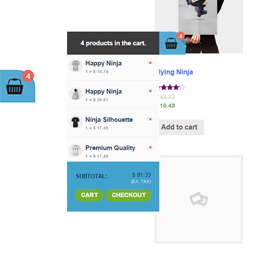
Product Detail View: The drawer expanded, displaying product thumbnails, quantities, and price breakdown. 
Admin Controls: A clean, intuitive settings panel inside the WooCommerce menu. 
Empty State Upsell: Best-selling products displayed when the cart is empty, keeping the customer engaged.
Pemasangan
- Upload the
woo-floating-minicartfolder to the/wp-content/plugins/directory. - Activate the plugin through the ‘Plugins’ menu in WordPress.
- Navigate to WooCommerce > Settings. You will see a new tab labeled “Floating Minicart”.
- Configure your colors, position, and empty-state preferences.
- Click ‘Save Changes’ and enjoy your new conversion-optimized cart!
FAQ
-
Will this slow down my site?
-
Absolutely not. We have refactored the plugin to use lightweight assets and hardware-accelerated CSS. It is designed to be invisible to your page speed score.
-
Does it work with block-based (FSE) themes?
-
Yes! Our latest version is fully compatible with both classic WooCommerce setups and modern Block/FSE themes.
-
Can I change the colors to match my brand?
-
Yes, you have full control over the primary, secondary, and button colors directly from the settings page.
-
What happens if the cart is empty?
-
You can choose to hide it completely or configure it to show your best-selling products to encourage the user to start shopping.
Mācā ulang


Contributors & Developers
“Floating Minicart for WooCommerce” is open source software. The following people have contributed to this plugin.
Kontributor


Translate “Floating Minicart for WooCommerce” into your language.
Interested in development?
Browse the code, check out the SVN repository, or subscribe to the development log by RSS.
Caathetan Owahan
4.0.0
- Major structural refactor for performance.
- Added CSS Custom Properties for seamless theme integration.
- Improved hardware-accelerated animations for smooth sliding.
- Enhanced compatibility with Block-based (FSE) themes.
- Optimized AJAX fragment handling.