Skip to content
WordPress.org

Jawa

  • Tema
  • Plugin
  • News
  • About
  • Tim
  • Pelokalan WP
  • Forum Basa Jawa
  • Sesambungan
  • Get WordPress
Get WordPress
WordPress.org

Plugin Directory

Webknit Site Toolkit

  • Submit a plugin
  • My favorites
  • Log in
  • Submit a plugin
  • My favorites
  • Log in

Webknit Site Toolkit

Dening Webknit Digital
Ngundhuh
  • Detil
  • Mācā ulang
  • Pemasangan
  • Pangembangan
Sokong

Katrangan

Webknit Site Toolkit lets a site administrator:

  • Recolor the wp-admin sidebar, links, buttons, and form inputs, entered as hex codes or picked visually.
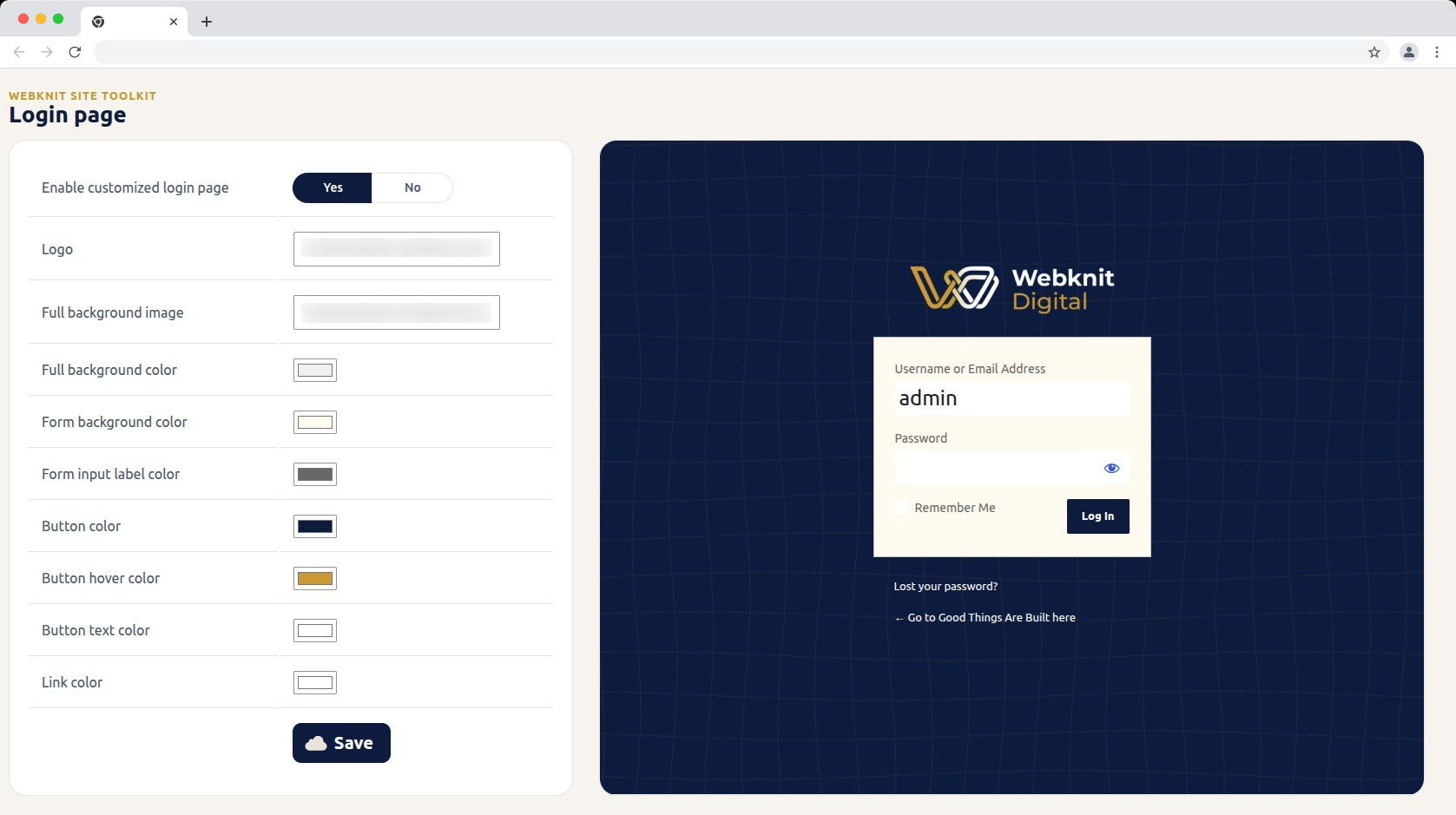
  • Customize the login screen: logo, full-page background image/color, form background/label colors, and button colors/text.
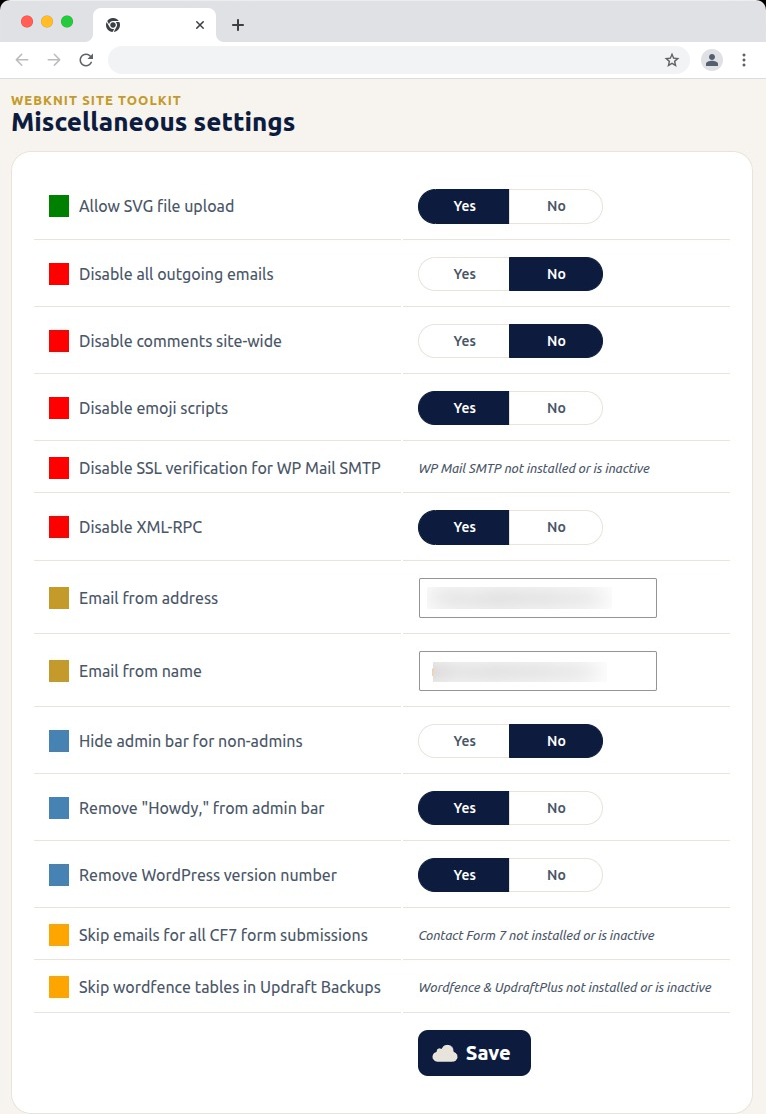
  • Toggle a set of miscellaneous settings: allow SVG uploads, disable SSL verification for WP Mail SMTP, disable outgoing emails, skip Wordfence tables during UpdraftPlus backups, skip Contact Form 7 submission emails, disable XML-RPC, remove the WordPress version number, disable emojis, hide the admin bar for non-admins, disable comments sitewide, remove “Howdy,” from the admin bar, and override the outgoing mail “from” name/address.

Gambar conto
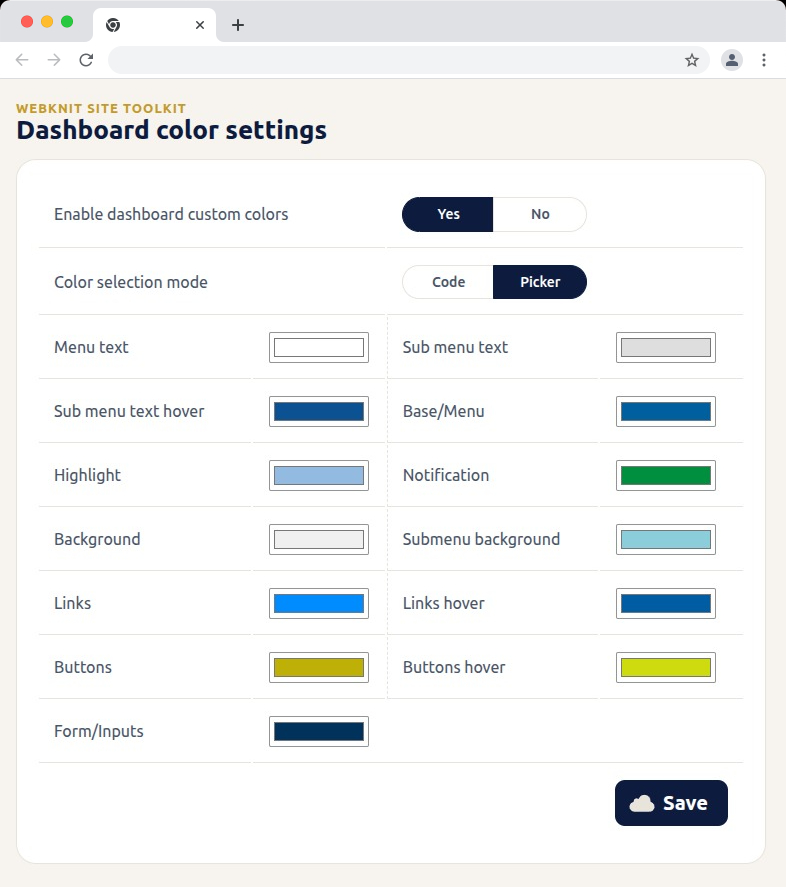
Dashboard color settings — recolor the wp-admin sidebar, links, buttons, and form inputs with hex codes or a visual picker.
Login page — customize the logo, background, form colors, and button styling, with a live preview alongside the settings.
Miscellaneous settings — toggle SVG uploads, outgoing email, comments, XML-RPC, and more; toggles for a plugin that isn't installed or active show a status message instead of a Yes/No choice.
Miscellaneous settings — toggle SVG uploads, outgoing email, comments, XML-RPC, and more; toggles for a plugin that isn’t installed or active show a status message instead of a Yes/No choice.

Pemasangan

  1. Upload the plugin files to /wp-content/plugins/webknit-site-toolkit, or install through the WordPress plugins screen directly.
  2. Activate the plugin through the “Plugins” screen in WordPress.
  3. Use the “Site Toolkit” menu in wp-admin to configure dashboard colors, the login page, and miscellaneous settings.

FAQ

Why does one of the Misc. settings toggles show a message instead of Yes/No?

That setting acts on another plugin (WP Mail SMTP, Contact Form 7, or Wordfence + UpdraftPlus) that isn’t currently installed or active, so the toggle would have no effect. The message replaces the toggle until that plugin is active; your previously saved choice is kept and reappears once it is.

I don’t see the “Site Toolkit” menu in wp-admin.

Access requires the manage_options capability, which by default only Administrators have.

I changed a color or setting and saved, but the site still looks the same.

Generated CSS is served with a cache-busting version, but browsers can still hold an old copy. Hard-refresh the page (Ctrl+Shift+R / Cmd+Shift+R) and confirm the save actually completed.

Where are the generated CSS files stored?

In wp-content/uploads/webknit-site-toolkit/. That directory must be writable by the web server, or dashboard/login color changes won’t apply.

Mācā ulang

There are no reviews for this plugin.

Contributors & Developers

“Webknit Site Toolkit” is open source software. The following people have contributed to this plugin.

Kontributor
  • Webknit Digital

Translate “Webknit Site Toolkit” into your language.

Interested in development?

Browse the code, check out the SVN repository, or subscribe to the development log by RSS.

Caathetan Owahan

1.0.0

  • Initial release.

Meta

  • Version 1.0.0
  • Last updated 6 dinā sing kepungkur
  • Active installations Kurang sākā 10
  • WordPress version 6.0 or higher
  • Tested up to 7.0.4
  • PHP version 7.4 or higher
  • Language
    English (US)
  • Tags
    admincolorsdashboardloginsettings
  • Nonton lanjutan

Peringkat

No reviews have been submitted yet.

Your review

See all reviews

Kontributor

  • Webknit Digital

Sokong

Got something to say? Need help?

View support forum

  • About
  • News
  • Hosting
  • Privacy
  • Showcase
  • Themes
  • Plugins
  • Patterns
  • Learn
  • Support
  • Developers
  • WordPress.tv ↗
  • Get Involved
  • Events
  • Donate ↗
  • Swag ↗
  • WordPress.com ↗
  • Matt ↗
  • bbPress ↗
  • BuddyPress ↗
WordPress.org
WordPress.org

Jawa

  • Visit our X (formerly Twitter) account
  • Visit our Bluesky account
  • Visit our Mastodon account
  • Visit our Threads account
  • Visit our Facebook page
  • Visit our Instagram account
  • Visit our LinkedIn account
  • Visit our TikTok account
  • Visit our YouTube channel
  • Visit our Tumblr account
Kode iku Geguritan.
The WordPress® trademark is the intellectual property of the WordPress Foundation.